
New Mac infostealer checks passwords before stealing data
A newly documented macOS malware campaign is raising concern among security researchers because it does more than steal passwords. It first checks whether the password is correct.
Jamf Threat Labs has identified a new Mac infostealer called PamStealer, which is being distributed through fake websites impersonating Maccy, a legitimate open source clipboard manager for macOS. The malware is delivered as a malicious AppleScript file inside a disk image, then retrieves a second stage Rust based payload that steals data from the infected machine.
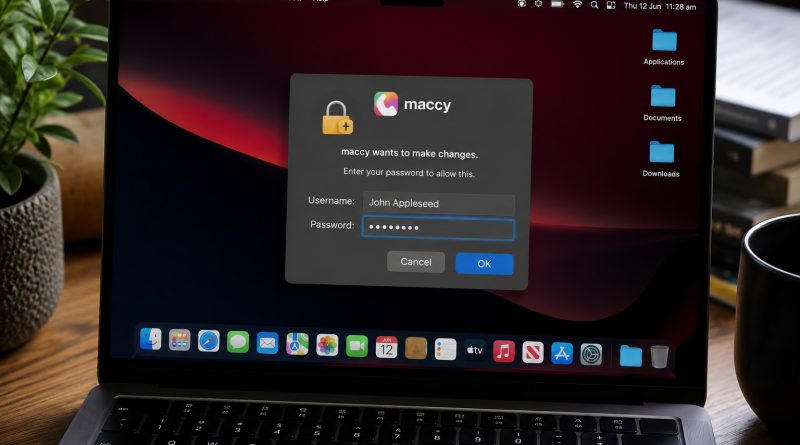
The unusual feature is PamStealer’s use of Apple’s Pluggable Authentication Modules, known as PAM. Rather than simply recording whatever a victim types into a fake password prompt, the malware validates the Mac login password locally before continuing. That gives attackers immediate confidence that the stolen credential will work.
The campaign begins with a lookalike download site that mimics the real Maccy project. The official Maccy website now warns users about fake sites impersonating the app and states that maccy.app is the only official website.
Once opened, the malicious download uses Script Editor to run hidden code that retrieves and launches the next stage of the attack. Jamf said the first stage uses native macOS APIs rather than common command line tools, reducing obvious process activity that defenders might otherwise detect.
PamStealer also appears selective about where it runs. Jamf found that the malware checks the target system’s CPU architecture, locale, keyboard layout and time zone before unlocking its configuration. In observed samples, the campaign was keyed to Apple Silicon Macs and included regional exclusions that could stop the malware from running on certain systems.
After the password is verified, the Rust payload begins collecting sensitive information. Jamf said the malware targets browser data, credential databases, cookies, wallet extension data and clipboard contents. It also reads the clipboard repeatedly, suggesting it is designed to capture information over time rather than take a single snapshot.
The malware then encrypts stolen information before sending it to attacker controlled infrastructure, making the network traffic harder to inspect. It also attempts to persist on the Mac by creating login items that allow it to relaunch when the user signs in.
In another social engineering step, PamStealer impersonates Finder and tries to persuade the victim to grant Full Disk Access through System Settings. If approved, that permission would allow the malware to reach protected data from other applications, including Mail, Messages and backups, without further prompts.
Security researchers say the campaign reflects the continued evolution of Mac malware. Rather than relying on a previously unknown software flaw, PamStealer combines fake branding, trusted macOS workflows, password prompts, login item persistence and encrypted communication to make the attack more convincing and harder to analyse.
The discovery is also a reminder that Mac users are not immune to infostealers. Attackers increasingly target popular apps and developer tools through fake search results, copycat domains and convincing download pages. In this case, the victim still needs to download software from an untrusted source and approve prompts, but the campaign is designed to make each step appear routine.
Users can reduce their risk by downloading Mac apps only from official developer websites, the App Store or trusted repositories. They should also check website addresses carefully, treat unexpected administrator password prompts as suspicious, and avoid granting Full Disk Access unless it is clearly necessary for software they trust.
Organisations should monitor for unusual login items, unexpected Finder lookalikes outside the normal system path, Script Editor activity that downloads or writes files, and processes repeatedly accessing clipboard contents. Keeping macOS and endpoint security tools up to date can also help detect or block known malware before it compromises a device.
PamStealer’s most important lesson is simple. Attackers are not only trying to steal credentials, they are improving the quality of what they steal. For Mac users and security teams, that makes caution around downloads, permissions and password prompts more important than ever.